Nanum Analytics
Status: Ready
See how many people visit your homepage, in the familiar web-analytics layout.
About this app
At a glance
In one line: your homepage's visitors on one screen.
The screen
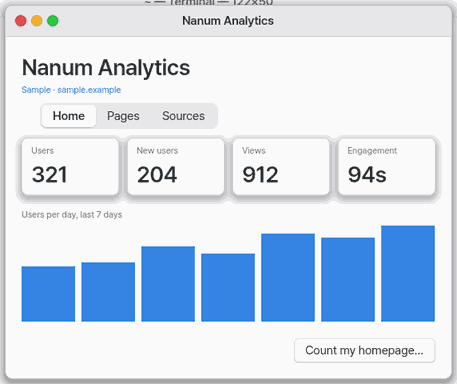
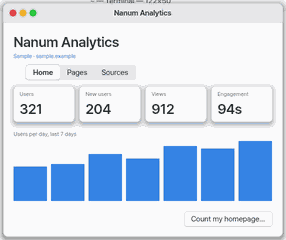
- Home: four cards (Users, New users, Views, Engagement) and the last seven days as bars.
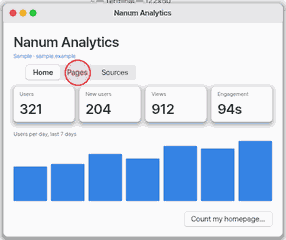
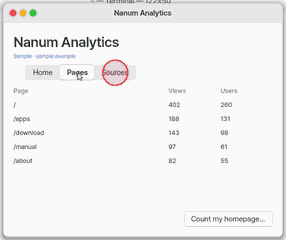
- Pages: the pages people open most, with views and users.
- Sources: where visitors came from (Direct, Search, Social, Referral).
- The small line under the title says what you are looking at: "Sample", or "My homepage" with the name and the time of the last update.
Task 1. Look at the numbers
- Open Nanum Analytics.
- Read the four cards and the seven bars.
Say: "Open Nanum Analytics"
Task 2. See the pages
- Press Pages.
- The top page is first.
Say: "Show the pages in Nanum Analytics"
Task 3. See your own homepage
- Press the button "Count my homepage…" at the bottom right of the Sample (or
Ctrl+,, or Settings, Analytics). - Open a page of your homepage in a browser: within a few seconds it is in the cards. Turn the switch off to stop; the tag leaves your pages.
Say: "What are today's numbers in Nanum Analytics?"
Basics
A visit is counted when a page of your homepage is opened in a browser. There are no cookies, no ids and no addresses kept. Think of a clicker at a shop door: it counts people coming in and knows nothing about them. The switch is off by default; to do now: look at the Sample, then decide.
What this app takes
- It takes nothing from this device and sends nothing out: no address on the internet is contacted by the app. With the switch on, the visits to your homepage are counted by a small program on this same machine and the numbers stay on this machine.
- It keeps counts only (day, page, referrer site name, country, browser family, screen size class); never a name, an address or a cookie. Turning the switch off stops counting and takes the tag out of your pages; the numbers stay until you press "Delete collected data" (a card asks first) in this app.
How to use it
- The screens are the stats dashboard's: a top bar with the property, a rail on the left (a bar at the bottom on a phone) with Home, Reports and Admin (Admin opens the settings). On Home press Users, New users, Views or Events to change the 7-day line; press View pages or View channels for the lists. Reports has the chips Realtime (users in the last 30 minutes, a bar per minute, views by page, users by source), Pages, Traffic acquisition, Insights (sentences made from the numbers) and Dashboard (four metric tiles with a small line); on a phone the chip row and the metric tabs slide sideways and the page scrolls. The date control opens a sheet (a bottom sheet on a phone) with Last 7 days and Last 28 days and Save; the property box at the top picks the Sample or your own homepage. The Left and Right keys still move between Home, Pages and Sources.
Ctrl+,opens the settings,Ctrl+Wcloses the window.- In the phone layout the Back button returns to Home first.
- With "My homepage" shown, the button "Delete collected data" at the bottom right deletes the counts for good after you confirm; your pages and the web server's own log are not touched, and the log from before that moment is not counted again.
How it works
The NanumOS window and the web version show the same screens. On a big screen, a maximised window keeps the web's one column of at most 1400 px. The Sample numbers are the same too: both count the same made-up visits. At the top are the app's mark and name, the property picker (「All accounts › Sample」 above the site name) and a grey search box: type part of a report's name and the matching reports show under it; click one or press Enter to open it (in the NanumOS window, / jumps into the box). On the left is a row of icons (Home, Reports, Admin at the bottom); the place you are on has a blue circle. The Pages and screens, Traffic acquisition and Demographics reports show the daily trend of the top five and a bar chart above a table with a totals row. Insights open as a panel on the right and say, in the web's words, what changed in the last 7 days against the 7 before.
In the Mac app the Sample is that same dashboard page: the app keeps a copy of it inside itself and shows it in the Mac's own web view, laid exactly over the window's inside, so it looks like the web version, always in the wide desktop layout. Nothing is fetched from the internet for it. When the window is closed, hidden behind another window or minimised, the page goes with it. My homepage (your own numbers) is drawn by NanumOS itself.
FAQ
Why do I see "Sample"?
The switch "See my homepage visitors" is off (or you are in the browser try-out). The numbers are made up by us.
Why is it empty after I turn it on?
Does anything leave my computer?
No. See "What this app takes" above.
What can it not do yet?
Try this
1. Read the Home cards
- Open the app and read the four cards.
2. Open the Pages report
- Press Pages.
3. See where visitors come from
- Press Sources.
Shortcuts
Left and Right: change tab (where the focus allows) · Ctrl+,: settings · Ctrl+W: close.
Settings
Settings, Analytics (the same sheet as Settings, Apps, Nanum Analytics, and Ctrl+, here): "See my homepage visitors" (off by default).
What it cannot do
NanumOS 0.1.15511 · 2026-11-25